



E-learning is a service for business education to meet the need for certification and dissemination required under the current italian regulations
MÉNTORE
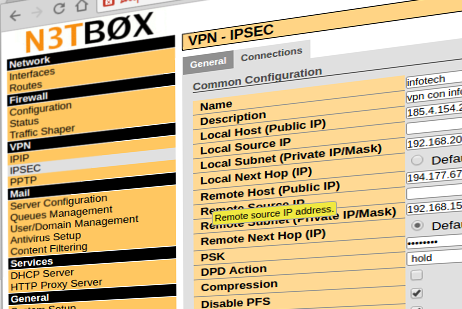
The NetBox combines versatility, power and ease of use in a single solution for the intranet and the Internet connection management.
NetBox
For over 15 years we offer to the students of the University of Padua the opportunity to undertake a period of practice in our headquarters
Stage
In order to implement an automated system designed to create encrypted copies of the data
contained in the Corporate Server's Scheduled Files and ensure that such data is subsequently transferred
in secure mode, to the outside of the business premises (Disaster Recovery Backup Service)
and stored at DATA CENTER Infotech, we offer the Secure Backup system that includes a Backup Server
with an emergency PDC function (manual) that is to be located in the customer premises.
This sever will execute, in a completely autonomous manner, scripts for copying on Corporate Servers, in a totaly schedulated or incremental mode.
Access and visibility to this data is permitted, in protected mode, only through sharing in read only mode.
Futher on, based on the established policies, if integrated with the Disaster Recovery service, the Backup Server will send the copied data through ADSL/HDSL connectivity already present (or any other that can be forseen and activated), during the periods of inactivity of the same (nights or weekends) to the Backup Server housed in Infotech's Data Center.
The Backup operations executed, will be placed into appropriate log files and email messages to sent to the person in charge at client's company and to our Support Center.
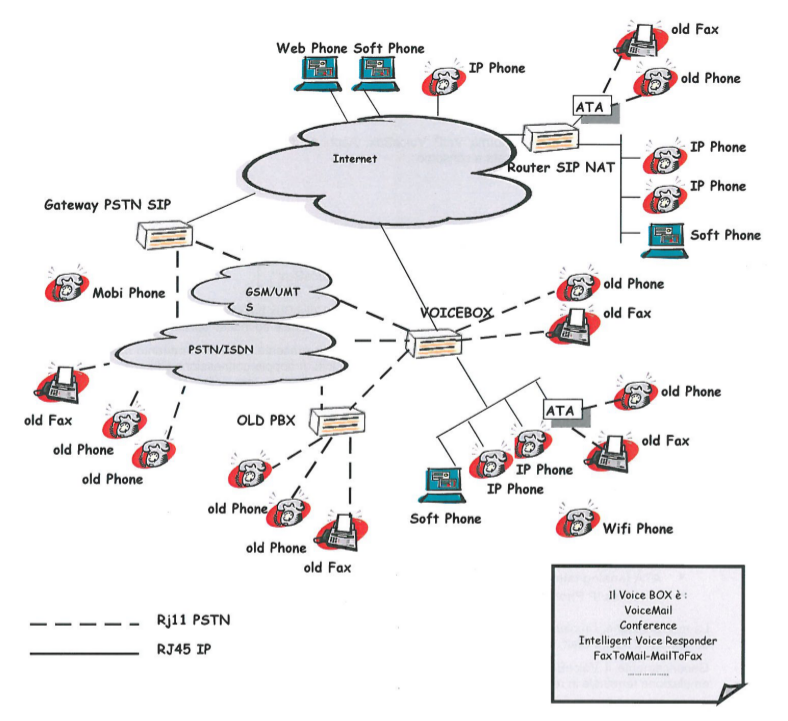
The VoiceBox apparatus forsees the configuration of a central VoIP telephone service for small and medium sized companies.
The VoIP VoiceBox is based on Linux/Asterisk and will be installed based on the clients necessities, with guarantee of industrialized and professional management by Infotech.
The VoiceBox will replace the already present telephone service. Therefore the already installed telephone devices will be replaced with VoIP devices, armed with double Ethernet connections (one RJ-45 Cat.5 Ethernet cabling for the LAN and telephone).
The maintenance, implementation of new options and technical support, can also be done remotely. Our staff, if the client requires it, can operate remotely through the internet (using for example TeamViewer).
Generally the VoiceBox does not require a console (maintenance through Browser or terminal emulation on-line using an SSH (Secure Shell) protocol.
In any case of malfunction, we guarantee complete restoration of VoiceBox services and previous configurations within 8 working hours thanks to the fact that the configuration of the various options is saved on a file, that can be automatically sent via e-mail to our Help Desk.
Main components of the VoIP Platform:
- Contact Center;
- PBXBase;
- TDM/ISDN (bus S0) Ports;
- GSM/UMTS Ports;
- Telephones;
- IP Telephones;
- ATA (Analog Telephone Adapter)
- Cordless IP Phone.
Componenti principali Piattaforma VoIP
- Centralino
- PBXBase
- Porte TDM ISDN (bus S0)
- Porte GSM/UMTS
- Telefoni
- Telefoni IP
- ATA ( Analog Telephony Adapter )
- Cordless IP Phone
 Contact us for futher support and assistance
The FaxBox apparatus enables management of incoming or outgoing corporate fax.
- no more paper, sending and reception through email to consult a fax from anywhere.
- automatic digitalization of documents.
- use of opensource software packages (Hylafax Server) so to save on licenses.
The posting will take place from the PC or Tablet of any authorized users, through a comfortable web interface, whilst reception will take place on the Fax Server that converts faxes into PDF format, then sends them to qualified users for these services, via email. The Fax-Server will store an archive of sent and received faxes. The manner and duration of this storage are definible as desired.
Main Client side web interface characteristics:
- visualization of fax, directly from PC/Tablet browser;
- visualization of miniature preview;
- fax rotation;
- fax download in PDF format;
- forwarding of fax to other e-mail (no client mail necessary);
- forwarding of fax as PDF attachment to an e-mail address;
- modification of fax description (for archive searches);
- storage and/or deletion of a fax (based on user privileges);
- fax number identification (CSID)
- cusomizable covers support with company logo;
- email2fax support;
- unlimited users;
- unlimited channels;
- fax numbers blacklist;
- phone book import from .vcf files (vCard);
- DB storage of received/sent faxes;
- archive fax search (received, sent, data, category, company);
- sending of faxes through the upload of PDF, TIFF and text files (TXT);
- postponed send;
- distribution list support;
Every valid user of the Fax-Server also has at his/her disposal:
- language selection;
- e-mail settings for notifications of correctly sent Faxes;
- customizable cover fields;
- resetting the access pasword.
Main Characteristics of the Web Server Interface:
- setting the network interface (IP/mask etc.);
- log management;
- multi-modem support and configuration;
- system information;
- backup/restore configuration;
- creation/management of user authorizations (visible channels, fax deletion, administrazion, email), DB dump configuration and archive backup/sharing (nfs, samba, etc.).
Other Advantages:
- multiplatform;
- remote access to interfaces;
- centralized digital fax archive, with masks for fast searches;
- drastic reduction in use of toner,paper, and printer maitenance;
- online contact list, usefull for reducing errors in dialing destination number.
Contact us for further support and assistance.
© 2026 Infotech Srl
Sede Legale e Operativa: Galleria Spagna 28 - 35127 Padova (PD)
Registro delle Imprese di Padova nº 03262490281